Key takeaways
- Define what data you want to sync. List the records and fields to send. Set which way each field moves.
- Define how fast the data must sync. Choose the longest wait your team can accept: right away, each hour, or once a day.
- Decide if you need to link other systems. If so, choose a platform that can link all of them. A tool built for just this pair may not fit.
- Set a budget for setup and support. Include software fees, staff time, and paid help. Plan how errors will be handled and what that help will cost.
- Decide who will maintain the integration. Agree on who will make changes and fix errors: your staff, a partner, or the vendor.
1. Define what data is syncing
List the records and fields to send between the two tools. Start with the data sales and finance need for each order.
For each record, note where it starts and where it goes. A sync A sync copies data from one system to the next. It can send a new record or a change. copies data from one tool to the next. Note what system action starts the process, such as a change to an order.
For example, sales could own the main contact in Salesforce. Finance could own payment terms in NetSuite. Choose one system to control each field.
Some tools add a Custom object A new type of record made for the data your team needs. for sales to use. This is a new record type, such as one made to hold invoices. Ask where staff will see it and what they can change.
Use this table to build your list. Fill in your own records, fields, and rules. Each row shows what to match when you set up the sync.
SalesforceOpportunityA won deal is ready for finance
Order details
NetSuiteSales OrderCheck lines, tax, currency, and terms
SalesforceInvoice or finance recordShow the amount due and paid status
Payment status
NetSuiteInvoice and PaymentAn invoice or payment changes
Use this as a starting plan. Ask the vendor to show both steps with your own data.
| Salesforce record | NetSuite record | Proposed direction | Start the flow when | Check before you build |
|---|---|---|---|---|
| Account | Customer | Both, with field rules | A customer is added or changed | Match saved IDs, not just names |
| Contact | Contact | Both, with field rules | Contact details change | Match the right customer |
| Product | Item | Usually NetSuite to Salesforce | An item is ready to sell | Match item codes and units |
| Opportunity | Sales Order | Salesforce to NetSuite | A won deal is ready for finance | Check lines, tax, currency, and terms |
| Order | Sales Order | NetSuite to Salesforce | An order status changes | Test orders from each source |
| Shipment record | Item Fulfillment | NetSuite to Salesforce | Goods ship | Show goods that ship in parts |
| Invoice or finance record | Invoice and Payment | NetSuite to Salesforce | An invoice or payment changes | Show the amount due and paid status |
| Quote | Estimate or Sales Order | Depends on how you quote | A quote is approved | Check the quote tool and later edits |
Download the field map (CSV). It has sample rows and space for your own fields. Add who controls each field, when it syncs, and how to handle errors.
2. Evaluate tools
Use your field list to compare tools. Each has its strengths and limits.
A connector Software that sends data from one tool to the next. moves data between two tools. Some come with rules that turn a won deal into an order. With others, you build those rules.
An integration platform A tool that moves data between your systems. You set which fields to send and when to send them. can link many apps in the cloud. The apps use an API A way for two tools to share data. One can ask the other to read or change a record. to share data. One app can ask it to read or change a record.
Compare integration methods
You can buy a connector, use a platform, or build your own link. Compare the work each choice leaves for your team.
| What to compare | Pre-Built Connector | Integration Platform | Custom API build |
|---|---|---|---|
| Best fit | Teams linking just these two apps | Teams linking more apps or adding rules | Teams with needs the tools cannot meet |
| What you get | Set syncs for named records | Tools to map fields, build rules, and track errors | Code built for your own rules |
| Who sets it up | An admin or partner | A trained admin, builder, or partner | A team that writes code |
| What you maintain | Field maps and any changes you add | Your syncs, field maps, and error rules | All code, access, alerts, and fixes |
| Cost to plan for | App fee, setup, and support | Platform fee, use, setup, and support | Build, hosting, and ongoing code support |
| Examples | Oracle connector, Breadwinner | Celigo, Boomi, Workato | A direct build using both APIs |
Some platforms also sell pre-built syncs. Celigo's app is one example. Your team still maps fields and adds any missing rules.
Custom code uses APIs too. REST is one API type, not a separate tool to buy. A partner can help with any of these methods.
Best fit by team
Find the row that matches your team and the work you need done. Company size helps, but your apps and rules matter too.
These are our picks based on docs, prices, and user reviews. We have not tested each tool ourselves.
| Option | Best fit | Main upside | Main drawback |
|---|---|---|---|
| Oracle connector | Teams that want Oracle to supply the sync | Built and sold by NetSuite | Only set record types; some sync just one way |
| Breadwinner | Sales teams that work in Salesforce | Reps can make orders and invoices from Salesforce | Built for sales and finance |
| Celigo | Mid-size firms that want a managed NetSuite sync app | Pre-built order and invoice syncs, with app updates from Celigo | Extra fields and rules still need setup |
| Boomi | Large firms with cloud apps and their own servers | Run syncs in the cloud or on your servers | Your team must look after its own servers |
| Workato | Teams that want pre-built syncs they can change | Start with order and quote syncs, then add your rules | More steps and more use can raise the bill |
| MuleSoft | Large firms with an in-house integration team | Build shared APIs once and reuse them across apps | Steep learning curve |
| Jitterbit | Sales teams that want pre-built CPQ billing syncs | Send orders and invoices; bring back paid and shipped status | Your own quote and billing rules still need setup |
| Skyvia | Small teams with data to sync at set times | Sync both ways with no added ID fields | Shared records can be copied twice on the first sync |
| Zapier | Small teams with a few simple syncs | Low base cost for syncs with few steps | You build order rules; each paid step adds to the bill |
| Custom code | Firms with a code team and unique rules | Full control of rules and where the code runs | Your team owns every fix |
| Partner-built | Teams that need help to build and run the sync | A hired team handles the build and fixes | Pay for both the tool and the work |
Compare the full 3-year cost
To evaluate total cost of ownership, you need to account for:
- Setup: The cost to build, test, and launch the sync.
- Software: A flat fee or a bill based on use.
- Support: The ongoing cost to check for errors, fix them, and make changes.
Sample costs, not a vendor quote.
- Setup and tests
- $18,000
- Software
- $36,000
- Support
- $9,000
Total$63,000
| Cost item | Assumption | Year one | 3 years |
|---|---|---|---|
| Setup and tests | One-time fee | $18,000 | $18,000 |
| Software | $1,000 each month | $12,000 | $36,000 |
| Support | $250 each month | $3,000 | $9,000 |
| Total | Replace these inputs with quotes | $33,000 | $63,000 |
If you own a platform, price the added work for this pair. Check if you need a higher plan or paid help. Compare that cost with starting on a new tool.
NetSuite Salesforce integration options
Oracle NetSuite Connector for Salesforce
Pre-Built ConnectorNetSuite sells this add-on to link the two apps. It turns won deals into sales orders. Names, phone numbers, items, and order data sync too.
- Best fit
Teams that want to buy the sync from NetSuite. It comes with set rules to turn won deals into orders.
- Price
Oracle does not list a price. Ask for a quote for the add-on, setup, and support.
- Reviews
As of this update, no user score is listed. The sites checked were G2 and Capterra.
- Main limit
The order syncs need a won sales deal to start. The same rule holds for shipped goods. They won't sync orders made any other way.
You need OneWorld with at least one subsidiary A firm owned by a larger firm.. That means a firm owned by a larger firm.
Both tools must allow more than one currency. Turn that on before you set up the app.
Follow the setup guide to link the two tools.
Breadwinner
Pre-Built ConnectorBreadwinner puts order and paid status in the sales app. Reps can see what's been billed and paid. They can also send new orders to NetSuite.
- Best fit
Sales teams that want to work from Salesforce. Reps can send orders to NetSuite from the same screen. They can see which invoices are paid too.
- Price
Price is by quote. Standard setup has no fee, but code built just for your team costs extra.
- Reviews
Users quoted by the vendor praise fast setup and good support. The vendor chose which quotes to share.
- Main limit
The app is built for this pair of systems. To link all your other apps, you may need a broader platform too.
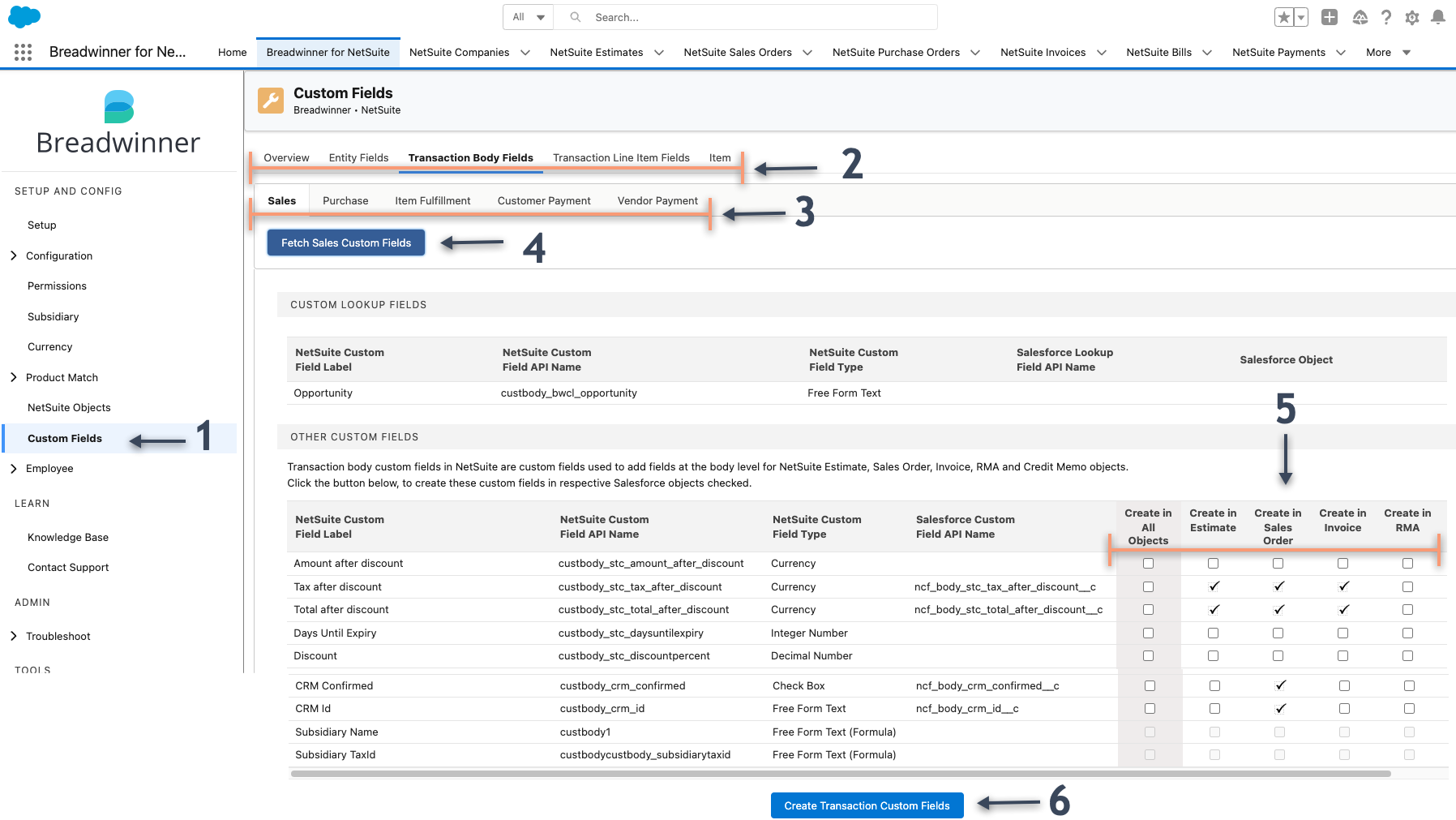
Reps can also make an invoice in Salesforce. The demo shows the steps. You need the Professional plan or higher.
Celigo
Integration PlatformCeligo has an app for Salesforce and NetSuite. The app syncs accounts, contacts, orders, invoices, and payments. You can add rules of your own.
- Best fit
Mid-size firms that want pre-built order and invoice syncs. Celigo keeps the app up to date. That leaves less code for your team to look after.
- Price
About $6,500 to $36,000 a year, based on Vendr's deal data. This is a rough range for the platform, not a price for this sync. Get a quote for your setup; it may cost more or less.
- Reviews
Celigo has 4.6/5 from 1,096 ratings on AWS. Users like the pre-built syncs. Some want more detail on which records passed each run.
- Main limit
The app covers a set list of syncs. Your team must map extra fields and build any rules it lacks. Adding more apps or syncs can raise the price.
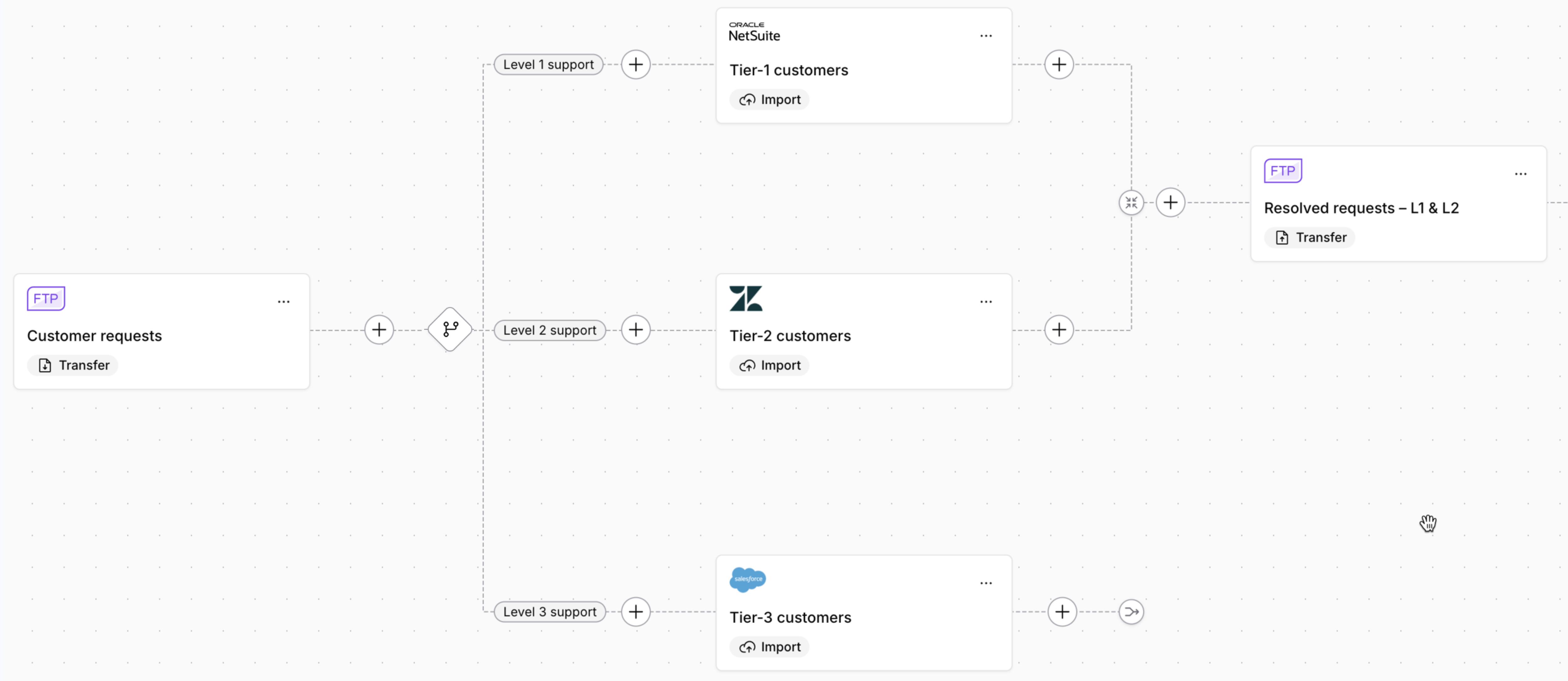
A flow is the route data takes, such as an order sent to finance. More routes can change the price, even if your order count stays flat. The app page lists the records it syncs. Plans charge by apps and data flows, not by order count.
Boomi
Integration PlatformBoomi moves data across apps. You join steps on a canvas, match fields, and set rules. It has order syncs for this pair.
- Best fit
Large firms that need to link cloud apps and software on their own servers. The same team can build and run both sets of syncs in Boomi.
- Price
The pay-as-you-go plan has a $99 monthly fee. You also pay $0.05 per Boomi Message. Other plans need a quote.
- Reviews
Boomi has 4.4/5 from 496 ratings on AWS. Users like the range of apps it connects. Some say setup takes time.
- Main limit
One order can use more than one paid message. Each send and reply can add to the bill on this plan.
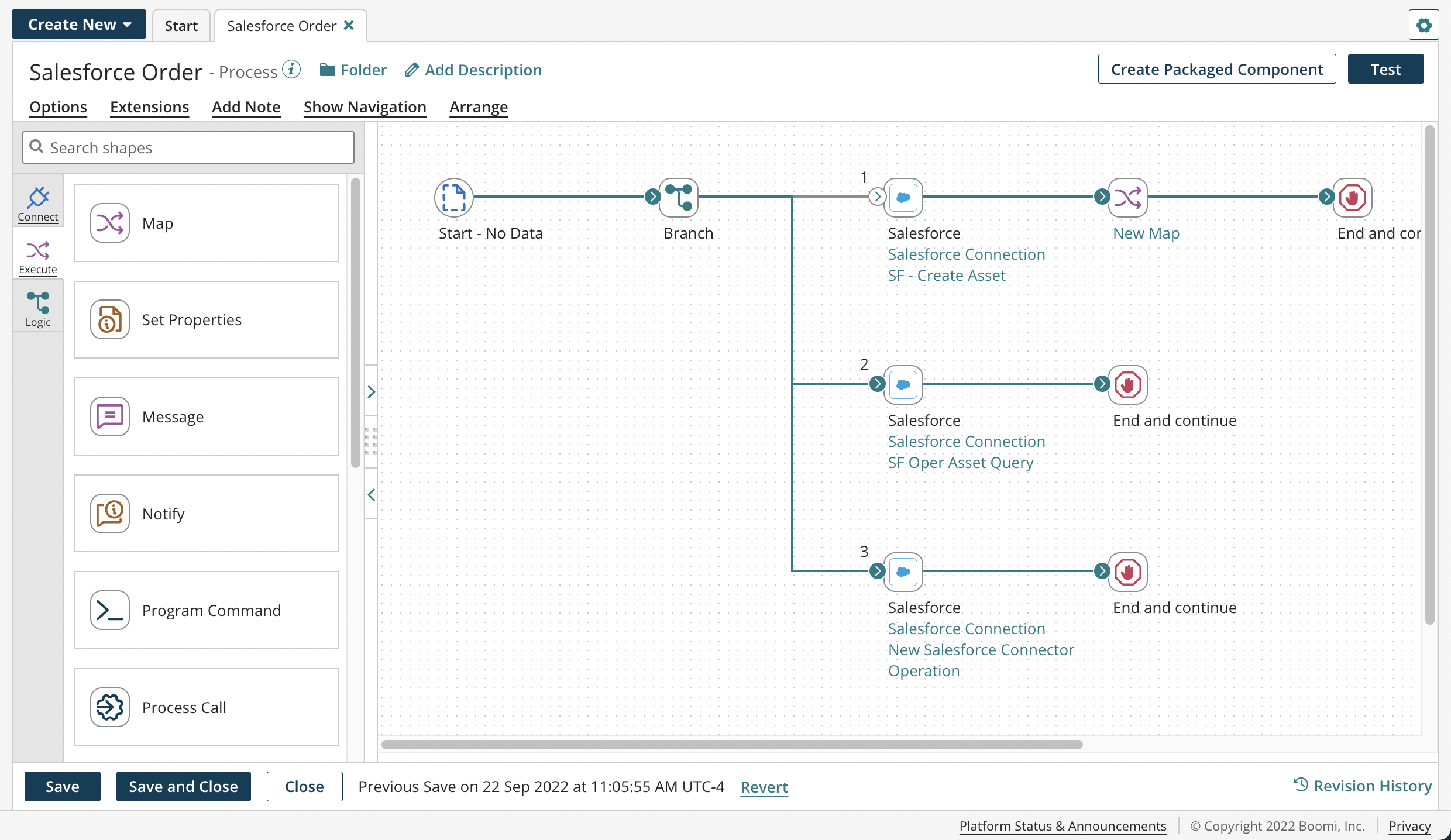
Its ways to run syncs include its cloud and your own servers. Your team must care for any server it runs. For order and billing syncs alone, compare its package with Celigo's app.
Workato
Integration PlatformWorkato lets you build rules across apps. It calls each set of steps a recipe. A new order can start one.
- Best fit
Teams that want pre-built order and quote syncs they can change. Its starter pack lets your team add fields, record types, and steps.
- Price
About $20,000 to $184,000 a year, based on Vendr's deal data. This is a rough range for the platform, not a price for this sync. Get a quote for setup and use; it may cost more or less.
- Reviews
Workato has 4.7/5 from 797 ratings on AWS. Users like how easy it is to build syncs. Some say it costs too much for small projects.
- Main limit
You pay for the platform and the steps your syncs run. More orders or more steps per order can raise the bill.
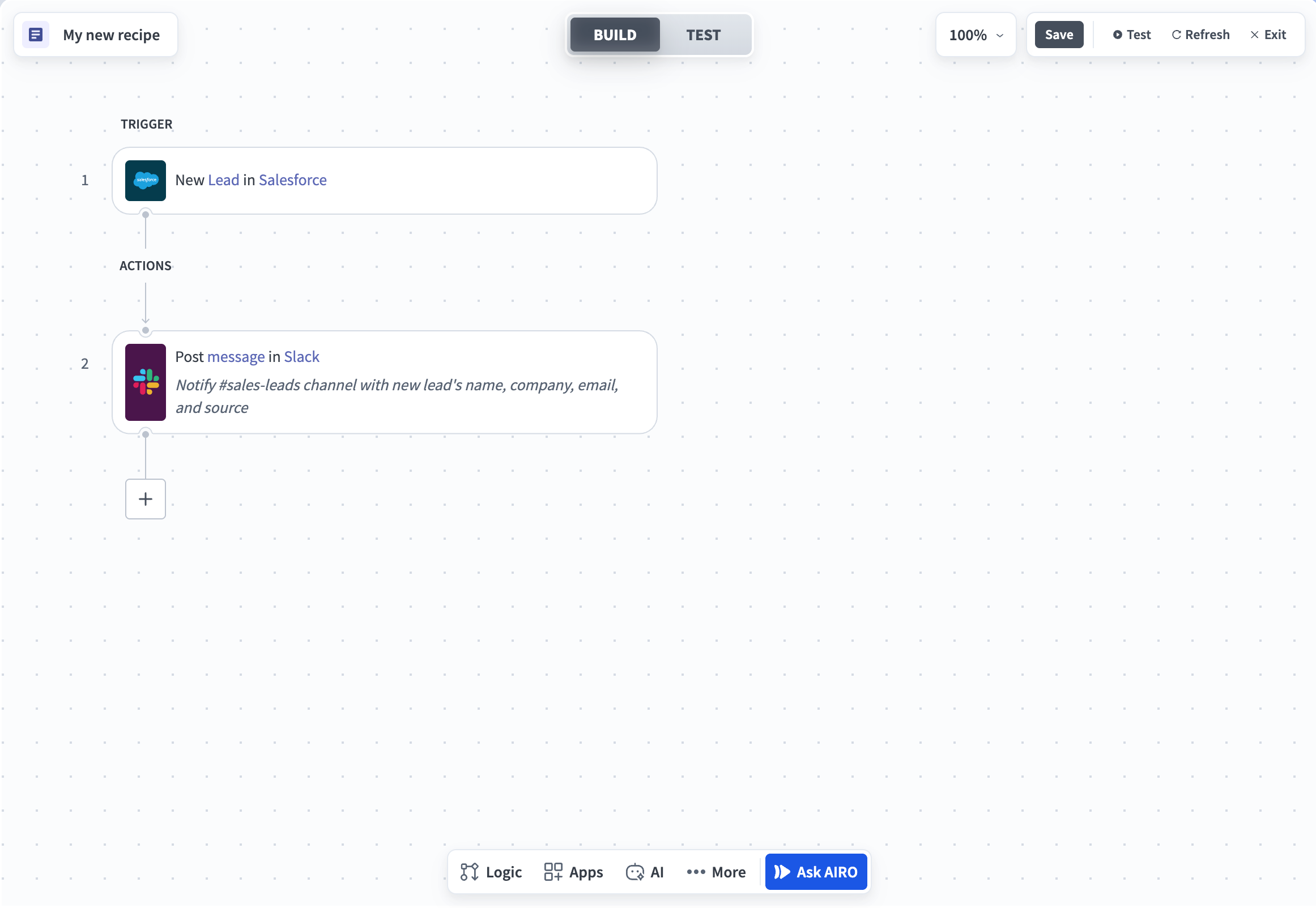
The pack turns won deals into NetSuite orders and Salesforce quotes into estimates. It brings invoices, payments, refunds, and balances back to Salesforce. You still need to map your fields and test your rules.
Its NetSuite connector uses REST, a way to share data through an API. It can find, create, and change records.
MuleSoft
Integration PlatformAnypoint lets teams write code that several apps can share. For example, each app could use the same API to read an order's status.
- Best fit
Large firms with an in-house integration team. They can build an API once and share it with other apps. The team sets the rules for who can use each API.
- Price
MuleSoft plans start at $2,000 a month, paid yearly. The price depends on the plan and how much you use. Get an Anypoint quote for this sync and its setup.
- Reviews
A Gartner user review praises how teams can reuse what they build. It also notes the high cost and time it takes to learn.
- Main limit
It has a steep learning curve. Your team needs time to learn how to build, test, and run the syncs.
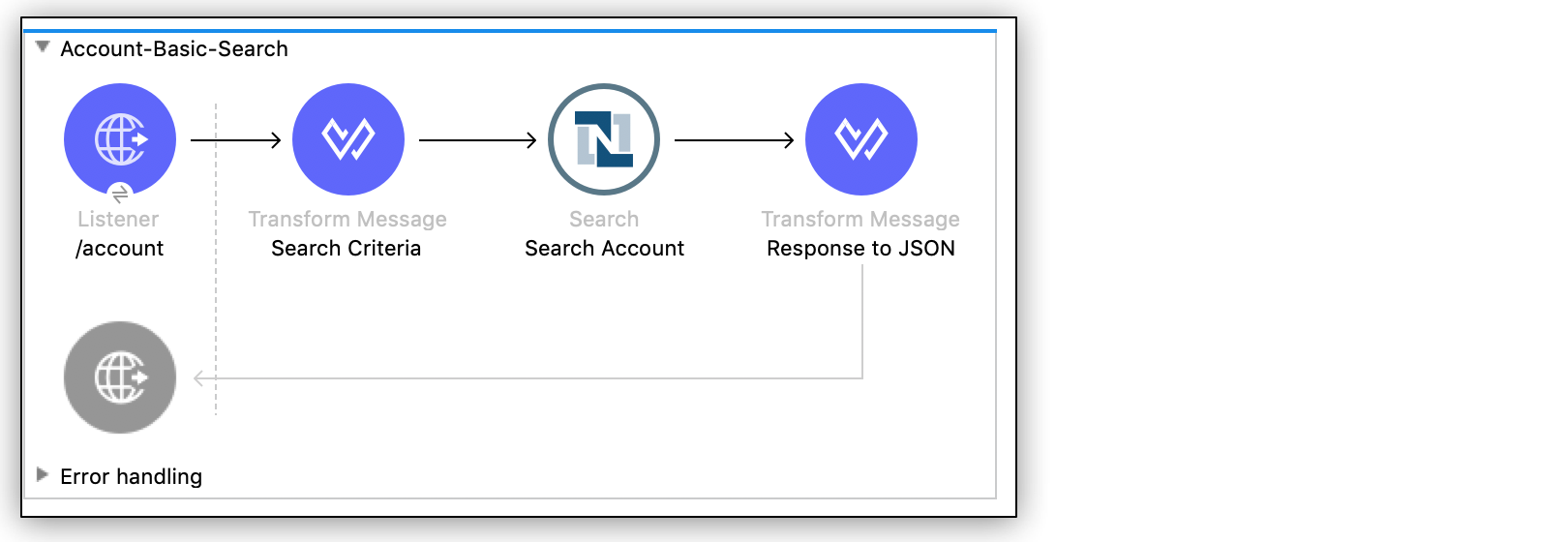
The new NetSuite connector uses REST. Connector 12 uses SOAP. If you use that version, plan to switch before Oracle ends SOAP in 2028.2.
There are also pre-built flows in Composer. They sync orders, invoices, and payments. This is a separate tool from Anypoint.
Jitterbit
Integration PlatformJitterbit has syncs for Salesforce CPQ, Billing, and NetSuite. You can build more syncs too.
CPQ helps sales build and price quotes. This package sends orders and invoices from Salesforce to NetSuite. It brings back payments and shipping status.
- Best fit
Sales teams that use CPQ and want pre-built billing syncs. These send orders and invoices to NetSuite. They bring back paid and shipped status.
- Price
About $12,700 to $50,000 a year, based on Vendr's deal data. This is a rough range for the platform, not a price for the CPQ package. Get a quote for setup and use; it may cost more or less.
- Reviews
A G2 user likes the support and scheduled loads. He wants to know when a record fails to save.
- Main limit
The package does not remove all setup work. Your team still has to map fields and add rules for how you quote and bill.
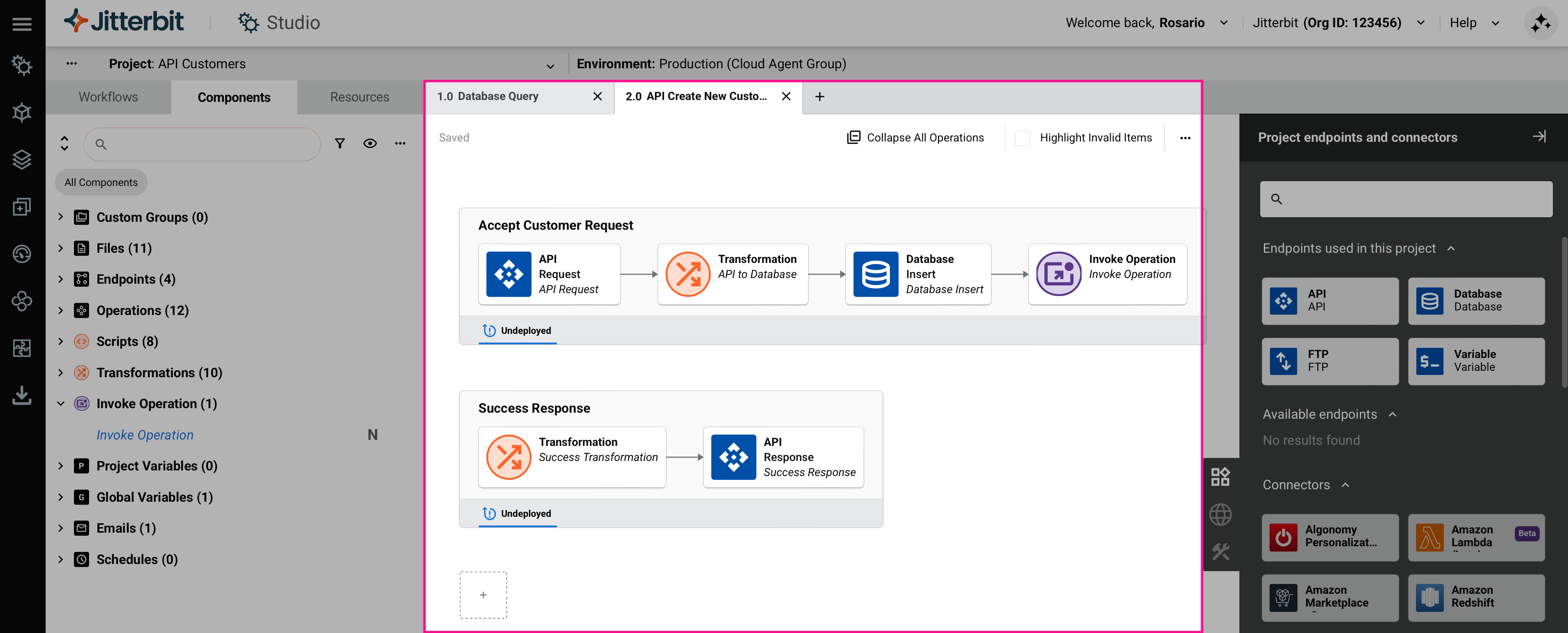
Other tools support CPQ too. Celigo has a CPQ template, and Workato has a CPQ connector. Compare which quote and billing steps come with each tool. A tool may read CPQ records but still need those steps built.
The product page lists the records it syncs. The connector in its NetSuite guide uses SOAP. For that version, you need a plan to move to REST too.
Skyvia
Integration PlatformSkyvia copies data at set times. You choose the source, match the fields, and set when it runs. It can send NetSuite data both ways, with order lines.
- Best fit
Small teams that need to copy data at set times. It can sync both ways, with no new ID fields to add to each app.
- Price
Paid plans start at $99 a month. With yearly billing, that drops to $79 a month. To run each hour costs from $199 a month. To run each minute costs from $499. Those two rates use monthly billing. Your sync type and record count also affect the plan you need.
- Reviews
G2 users like the easy setup and low cost. Some want more choice of run times and better help guides.
- Main limit
The first two-way sync does not check for records that match. If both apps hold the same records, it can create copies of them.
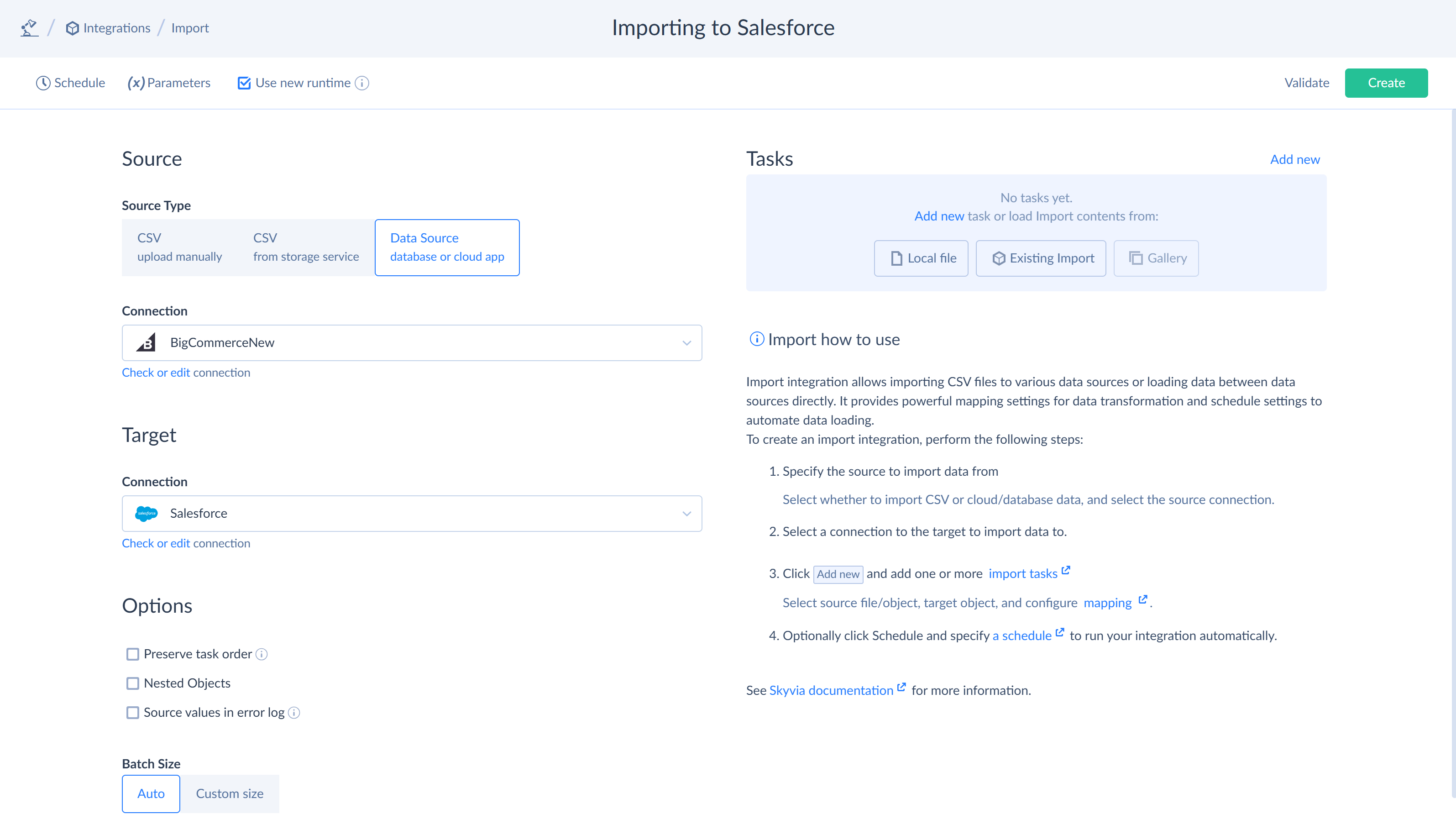
The lowest paid plan runs once a day. Faster plans cost more. The price also depends on how many records you send. The NetSuite guide shows what you can sync.
An order holds a list of lines. Each line needs a map for its fields, such as price and count.
Zapier
Integration PlatformZapier runs steps called Zaps to move data between apps. Each Zap starts with an event, such as a new lead. It can find, add, and change records in NetSuite.
- Best fit
Small teams with a few simple syncs, such as adding new leads to NetSuite. Its low starting price suits work with few steps.
- Price
Professional starts at $19.99 a month, paid yearly, with 750 tasks a month. Saving a record counts as one task. Extra tasks cost more, and NetSuite needs a paid plan.
- Reviews
Zapier has 4.5/5 from 2,075 ratings on AWS. Users like the easy setup. Some say costs rise as they add more work.
- Main limit
You must build the steps for order lines and later edits. One order can use several paid tasks. Zaps check NetSuite at set times, so changes may take time to show.
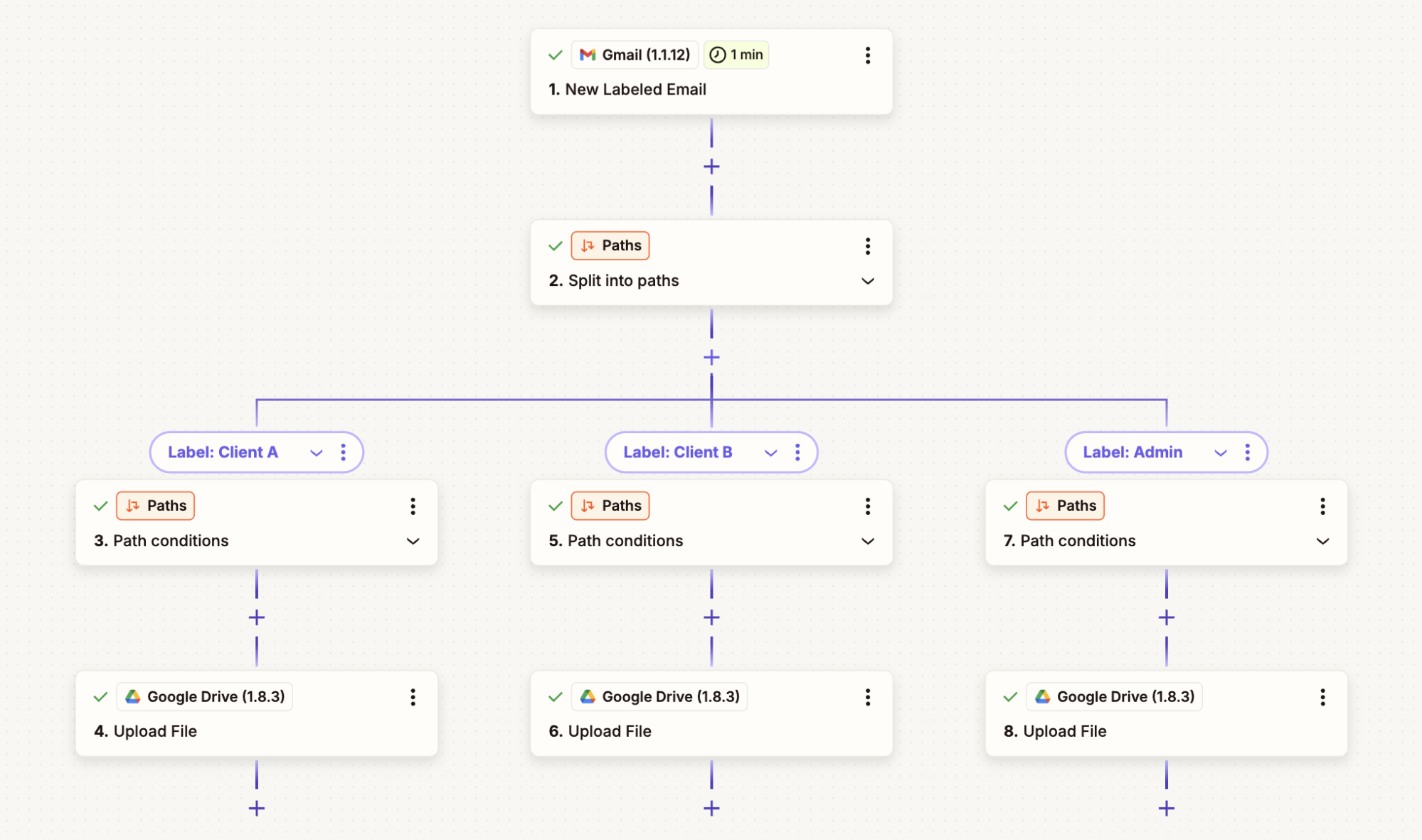
Your admin must first add the Zapier Automation SuiteApp to NetSuite. They must turn on API access too. The setup guide shows each step.
To sync orders and paid status, compare that build with Celigo's app. Zapier's low base price does not include someone to build or fix your Zaps.
Other ways to build it
Custom code
Your team can write code to send and change records. Use this when you need rules that packaged tools lack.
You pay for the build and a place to run it. An integration engineer A person who builds and fixes the steps that share data. They also look after those steps when things change. writes and fixes the code. Name who will take over when that person leaves.
For new NetSuite builds, Oracle says to use REST with OAuth 2.0. OAuth grants access without using a person's password. Oracle plans to remove SOAP web services in release 2028.2. See the API guidance.
Help from a partner
A partner is the firm you hire to build the sync. It can use any of the tools above. Its fee is separate from the software price.
Choose the tool and the team as two decisions. Your firm should own the accounts and keep the field maps. The contract should say who fixes errors and how you can change firms.
Common problems
When a sync fails, trace one record to the step that stopped. Check its data and rules before replacing the tool.
| What you see | What may cause it | What to check |
|---|---|---|
| A customer appears twice | Names are used to match records | Match saved IDs and review the old copies |
| An order is created twice | A retry creates the order again | Look for the source order ID before making a new order |
| Finance totals differ | Tax, discounts, or rounding differ | Compare the same order line by line |
| Some orders never come back | The tool skips orders from some sources | Test an order from each source |
| A field keeps changing back | Both systems change the same field | Give one system control of that field |
| Jobs stall on busy days | The system or plan has hit a limit | Check the allowed load and spread out queued work |
| Costs rise after launch | You add syncs, send more data, or need more support | Match the bill to the work in your quote |
Frequently asked questions
Does Salesforce integrate with NetSuite?
Yes. You can buy a ready-made tool or build your own. You can also use a platform to build the steps.
Test the tool you own first, using the records you need. Compare the records and sync rules each plan includes. You also need to check the editions of both systems.
Is there a free tool?
Zapier's free plan cannot connect to NetSuite. You need a paid plan. Its free trial lets you try paid features before you buy.
Skyvia has a free plan with record and schedule limits. Check that it supports the records you need. Free software still takes time to set up and look after.
Do I need OneWorld and an API license?
For Oracle's tool, you need OneWorld. On Salesforce Professional, you don't need an API license. If you have one, the setup steps change.
An API lets two tools read or change data. Ask the vendor to check your plan and the way you'll grant access. Read the setup guide with them.
Other tools set their own rules. Check those rules before you pay to switch plans.
Is the sync one way or two way?
You can build it either way. Two-way sync does not mean both tools should change each field.
You could send an order to NetSuite and bring its paid status back. Give one system control of each field. That way, the other tool won't overwrite a change.
Does it support real-time sync?
Some syncs start when a record changes. Others send a batch, which is a group of records sent at a set time.
Ask the vendor to show the delay for your records and plan. Test it on a busy day and after a lost connection. Set the longest wait your team can accept.
Can I use REST APIs instead of a platform?
Yes, if your team can build and look after the code. You must set access rules, match fields, and handle failed requests. Someone also needs to watch for errors and fix them.
Oracle says to use REST with OAuth 2.0 for new NetSuite builds. It plans to end NetSuite SOAP web services in release 2028.2. See the API guidance.
How much does the full setup cost?
Add the cost to build it, run it, and fix it. Most tools need a quote for the work you plan to do.
Use the 3-year worksheet above to compare quotes for the same data syncs. Include staff time, support, and later changes. A software plan price will not cover the whole job.
How long does setup take?
The time depends on what you need to build and test. Ready-made steps can save time when they match how your team works.
Ask the vendor to name each step and give it a date. Include time to fix old data, test real orders, and train staff. Check what could hold up that plan before you set a launch date.
Is the Data 360 connector the same thing?
No. Data 360 can read data from NetSuite. This does not set up the steps to send an order back.
Check the source list against the records you need to send.
Oracle has a sample you can build on. It sends won Salesforce deals to NetSuite as orders. Your team must set it up, and it comes with no support.
This sample is not the managed connector.
Sources and last verified
Provider facts last checked September 22, 2026. The rest of the guide was checked September 21, 2026. Review counts can change. Links sit beside the claims. Open Sources below to see the main links.
For help with your next test, talk to our team.
Sources 30 links
- Oracle: connector prerequisites, accessed Sept. 19th, 2026
- Oracle: order sync scope, accessed Sept. 22nd, 2026
- Oracle: connector setup wizard, accessed Sept. 19th, 2026
- Breadwinner: NetSuite integration, accessed Sept. 19th, 2026
- Breadwinner: pricing, accessed Sept. 22nd, 2026
- Breadwinner: AppExchange listing and vendor-selected quotes, accessed Sept. 22nd, 2026
- Celigo: Salesforce NetSuite integration app, accessed Sept. 19th, 2026
- Celigo: Vendr reported contract range, budget estimate only, accessed Sept. 22nd, 2026
- Celigo: G2 reviews on AWS Marketplace, accessed Sept. 22nd, 2026
- Boomi: Salesforce NetSuite solution, accessed Sept. 19th, 2026
- Boomi: pay-as-you-go base fee and message rate, accessed Sept. 22nd, 2026
- Boomi: AWS Marketplace reviews, accessed Sept. 22nd, 2026
- Workato: Salesforce NetSuite accelerator, accessed Sept. 22nd, 2026
- Workato: Vendr reported contract range, budget estimate only, accessed Sept. 22nd, 2026
- Workato: AWS Marketplace reviews, accessed Sept. 22nd, 2026
- MuleSoft: NetSuite REST connector reference, accessed Sept. 22nd, 2026
- MuleSoft: pricing, accessed Sept. 22nd, 2026
- MuleSoft: Gartner Peer Insights review, accessed Sept. 22nd, 2026
- Jitterbit: pre-built CPQ and billing syncs, accessed Sept. 22nd, 2026
- Jitterbit: Vendr reported contract range, budget estimate only, accessed Sept. 22nd, 2026
- Jitterbit: G2 reviews, accessed Sept. 21st, 2026
- Skyvia: NetSuite REST connector, accessed Sept. 19th, 2026
- Skyvia: pricing, accessed Sept. 22nd, 2026
- Skyvia: G2 reviews, accessed Sept. 22nd, 2026
- Zapier: NetSuite setup and supported actions, accessed Sept. 21st, 2026
- Zapier: pricing, task allowance, and editor screenshot, accessed Sept. 22nd, 2026
- Zapier: G2 and PeerSpot reviews on AWS Marketplace, accessed Sept. 22nd, 2026
- NetSuite API: SOAP retirement, accessed Sept. 21st, 2026
- Salesforce: Data 360 sources and targets, accessed Sept. 19th, 2026
- Custom build: Oracle sales-order sample, accessed Sept. 21st, 2026